































WhatsApp New Year 2026 Update: New Festive Stickers, AR Call Filters, and Confetti Effects Rolled Out
Meta-owned WhatsApp rings in 2026 with a massive update! From animated '2026' stickers and confetti blasts to AR video call filters and improved low-light mode for midnight wishes. Here is how to use the new features.

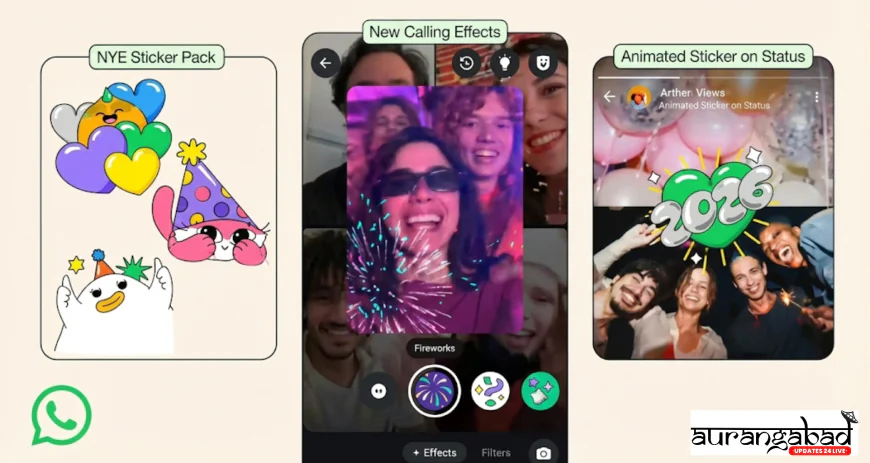
San Francisco / New Delhi: As the world prepares to bid farewell to 2025 and welcome 2026, the digital celebration is set to get a lot more colorful. Meta-owned messaging giant WhatsApp has announced a suite of festive features designed to make virtual greetings more interactive and engaging.
Rolled out globally on Tuesday (December 30), the update introduces animated New Year stickers, augmented reality (AR) effects for video calls, and enhanced group tools to help users plan their New Year's Eve parties. Whether you are sending a text at midnight or video calling family from miles away, here is how WhatsApp is upgrading your experience this year.
1. The 'Confetti' Chat Takeover
The most visible change users will notice immediately is the interactive chat animations.
-
The Magic Words: When users type specific phrases like "Happy New Year", "2026", or "Happy Holidays" in a chat, a burst of colorful confetti will animate across the screen for both the sender and the receiver.
-
Animated Emojis: Several existing emojis, particularly the party popper (🎉), fireworks (🎆), and clinking glasses (🥂), have received an animated upgrade. Sending these emojis alone (without text) will trigger a larger, 3D-style animation that fills the chat bubble.
2. New '2026' Sticker Packs
Stickers have become the preferred language of celebration on WhatsApp, and the platform has dropped a fresh collection for the occasion.
-
Curated Packs: The new sticker pack, titled "New Year, New Vibes", features animated graphics ranging from dancing numbers (2-0-2-6) to countdown clocks and festive avatars.
-
GIPHY Integration: WhatsApp has also tightened its integration with GIPHY, allowing users to search for "New Year 2026" and instantly find trending GIFs and stickers without leaving the chat window.
3. Video Calls Get a Makeover: AR Filters & Backgrounds
Since many people can't be with their loved ones in person, WhatsApp has significantly upgraded its video calling interface to make virtual toasts more fun.
-
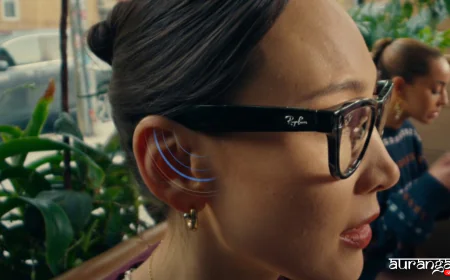
Festive AR Filters: Taking a page from Instagram and Snapchat, WhatsApp has introduced real-time AR masks. Users can now apply "2026 Glasses," "Party Hats," or "Sparkle Cheeks" filters during live video calls.
-
Background Replacement: If your room is messy or you just want a festive vibe, you can replace your real background with a virtual "Fireworks Display" or a "Cozy Winter Cabin" backdrop.
-
Low Light Mode: Perhaps the most useful feature for midnight calls is the improved Low Light Mode. Since most New Year calls happen at night in dimly lit rooms or outdoor parties, this feature uses AI to brighten the video feed and reduce graininess, ensuring your face is clearly visible even in the dark.
4. Party Planning Tools for Groups
For those organizing physical gatherings, WhatsApp has enhanced its group utility features to streamline the chaos of party planning.
-
Pinned Polls: Group admins can now pin "Polls" to the top of the chat for up to 24 hours. This is perfect for last-minute decisions like "Pizza or Biryani?" or "What time should we cut the cake?" ensuring the question doesn't get lost in the flood of messages.
-
Voice Chats for Large Groups: Instead of ringing everyone's phone, the "Voice Chat" feature allows members of large groups to join a quiet, discord-like audio lounge to discuss plans without disturbing others who are busy.
5. How to Get These Features?
These features are currently rolling out to both Android and iOS users globally. To ensure you have access before the clock strikes twelve:
-
Update the App: Go to the Google Play Store or Apple App Store and tap "Update" on WhatsApp.
-
Restart: If the features don't appear immediately, close the app from your recent tasks and reopen it.
-
Check Filters: Start a video call, tap the "Magic Wand" icon, and browse the bottom tray to see the new effects.
Meta’s Push for 'Connection'
In a blog post accompanying the release, Meta stated, "New Year’s Eve is consistently the biggest night for WhatsApp globally in terms of message and call volume. We want to ensure that distance doesn't dull the sparkle of celebration. These tools are designed to bring people closer, making every wish feel personal and every call feel like a party."
Conclusion
As we countdown the final hours of 2025, WhatsApp's timely update ensures that your digital greetings won't be boring. So, get your "2026" stickers ready, test out the low-light mode, and prepare to flood your family groups with confetti.
Happy New Year 2026!